

Best Smart Home Devices for 2026: Top Picks & Guide
Table of Contents
- Best Smart Home Devices for 2026: Quick Comparison Table
- Best Smart Home Security Cameras for Peace of Mind
- Smart Home Energy-Saving Devices That Cut Utility Costs
- Matter-Compatible Smart Home Devices: Why They Matter in 2026
- Best Smart Home Devices for Beginners: Start Simple
- Smart Locks and Access Control: Secure Your Entryways
- How to Choose the Right Smart Home Devices for Your Lifestyle
- Frequently Asked Questions
Last Updated: October 13, 2026
Best Smart Home Devices for 2026: Quick Comparison Table
The best smart home devices for in 2026 install in minutes, stay connected to your Wi-Fi, and actually talk to each other. At Smartest Home Devices, we built our catalog around that idea: most buyers just want a doorbell that shows who's at the door and a camera that still works reliably after setup.
Here's the short version before we get into the details:
| Device | Price | Best For | Standout Feature |
|---|---|---|---|
| Smart Video Doorbell | $35.99 | Front-door monitoring | Two-way audio, infrared night vision |
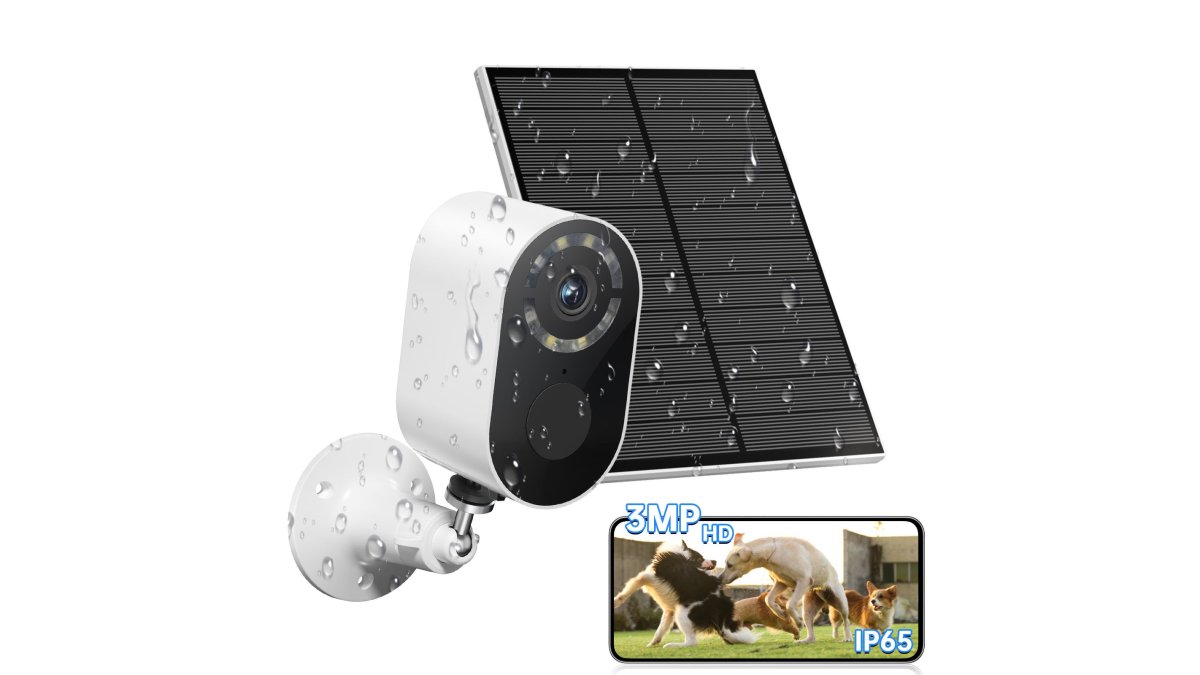
| Solar Battery Security Camera | $45.99 | Driveways and yards | Solar panel plus 5200mA battery |
| Security Cameras Wireless Outdoor, 1080P | $15.99 | Budget outdoor coverage | 120° view, color night vision |
| AI Detection 360° Bulb Camera | $21.99 | Porch and garage sockets | Pan 350°, tilt 90°, AI human tracking |
| Graffiti Smart Fingerprint Door Lock | $85.09 | Entry doors | Fingerprint, password, Bluetooth, Wi-Fi |
| A9 Smart HD Wi-Fi Camera | $19.99 | Indoor and outdoor | 1080P, 10m to 30m range |
| 15W 3-in-1 Wireless Charger Stand | $35.99 | Bedside and desk | Charges phone, watch, and earbuds together |
Below, we'll show you how to pick the right mix for your home, and what to skip until you actually need it.

Best Smart Home Security Cameras for Peace of Mind
Security cameras are the entry point for most households, and you don't need to spend much. Our Security Cameras Wireless Outdoor, 1080P model costs $15.99 and runs on a 5200mAh battery with no wiring.
- Solar Battery Security Camera ($45.99): A 1.6W solar panel keeps the 5200mA battery topped up, so you rarely think about charging. Best for spots with direct sun.
- AI Detection 360° Bulb Camera ($21.99): Screws into a standard E27 socket. It pans 350° and tilts 90°, with AI human tracking and a built-in floodlight.
- A9 Smart HD Wi-Fi Camera ($19.99): Works indoors and outdoors, with a 10m to 30m effective range and night vision.
Smart Home Energy-Saving Devices That Cut Utility Costs
Energy-saving smart home devices work best when they automate small habits you'd otherwise forget. Lighting schedules and smart plugs are the two biggest wins, and neither requires an electrician. The real savings come from tying those devices to sensors and routines so the home reacts to occupancy instead of a clock. The trick is scheduling, not gadget count: a lamp that turns off at 11pm saves more than a hallway full of devices you never configure, and a motion-triggered hallway light saves more than both.

The three device categories that actually move the needle
- Smart plugs and smart outlets. The cheapest, highest-leverage entry point. Anything with a dumb on/off switch, a space heater, coffee maker, window AC unit, holiday light string, becomes schedulable for the price of a plug. Look for plugs that report energy usage, not just on/off state.
- Smart bulbs and smart switches. Bulbs are renter-friendly and install in seconds; in-wall switches control the whole fixture and are the better long-term choice for homeowners. A common pattern: bulbs in lamps, switches on ceiling fixtures.
- Smart thermostats and smart vents. The biggest single-line-item savings in most homes, because heating and cooling dominate residential energy use. A thermostat that learns your schedule stops conditioning an empty house.
How to build routines that survive contact with real life
- Set outdoor lights to run from dusk to dawn rather than all day; a photocell or astronomical timer in the app handles this automatically.
- Group devices into routines so one tap handles the whole room, "Goodnight" should kill the downstairs lights, drop the thermostat, and lock the doors.
- Use motion detection instead of always-on lighting in hallways, garages, and laundry rooms.
- Add a "nobody home" condition using your phone's location or a presence sensor, so routines pause when the house is empty.
If you already own a camera with a floodlight, you've got a motion sensor built in. Pair it with a smart plug for a porch lamp and you've created a routine without buying anything new. A video doorbell works the same way: its motion events can trigger an entryway light.
What to skip until you actually need it
Smart vents and per-room mini-split controllers only pay back in homes with uneven heating or multiple unused rooms. In a small apartment with one thermostat, a smart plug and a couple of bulbs capture most of the savings. Buy the cheap layer first, measure your usage for a month, then decide.
Matter-Compatible Smart Home Devices: Why They Matter in 2026
Matter is an open connectivity standard that lets smart home devices from different brands work together through a single app or hub, so you stop juggling five apps to control five rooms.
This is the part most buyers get wrong. The Connectivity Standards Alliance overview of Matter explains the technical side, but here's what it means for you: check compatibility before you buy, not after.
A few practical rules:
- Look for Wi-Fi and Bluetooth support on the box, since both are common building blocks
- Keep your devices on one network band where possible to reduce lag
- Update firmware when prompted; older firmware is a common cause of dropouts
Our Graffiti Smart Fingerprint Door Lock supports fingerprint, password, Bluetooth, and Wi-Fi entry, which gives you several ways in if one method fails.

Best Smart Home Devices for Beginners: Start Simple
The best smart home devices for beginners set up in under 15 minutes with no wiring and no hub. Start with one camera and one lock, live with them for a month, then expand. New parents and renters are our most common first-time buyers, and the pattern is always the same: they overbuy, get overwhelmed, and abandon the whole thing.
Mistake one: buying into an ecosystem you can't leave
Every smart home device talks to an app. The question is whether that app is the only way to control it.
The fix is to prioritize devices that support Matter, the open connectivity standard backed by the major platform vendors.
When shopping, look for the Matter logo on the box or product page. If a device doesn't list Matter, check whether it supports Wi-Fi or Thread rather than a proprietary bridge.
Mistake two: leaving default security settings in place
AI-powered devices in 2026 ship with more defaults than ever, and most favor convenience over privacy. Settings worth changing on day one:
- Change the default admin password on every device before it touches your Wi-Fi. Default credentials are the single most common way home cameras get compromised.
- Turn on two-factor authentication in the device app if it's offered. It's the difference between a stolen password and a stolen account.
- Check where footage is stored. Cloud storage means your video lives on someone else's server; many cameras support local storage via microSD or a local hub.
- Segment your network if you can. Putting smart devices on a separate Wi-Fi network or guest SSID limits what a compromised camera can reach.
FCC guidance on securing your home network and connected devices is worth a read before you add anything else to your Wi-Fi.
A starter order that respects both mistakes
- Front door first. The Smart Video Doorbell ($35.99) installs without wiring and gives you app control, two-way audio, and infrared night vision. Check that it supports Matter or at least a standard protocol.
- One outdoor camera second. The $15.99 wireless model covers a driveway or side gate. Confirm it supports local storage if you'd rather not pay a subscription.
- A lock third. Move to the fingerprint lock once you know you'll actually use the app. Locks are the device most likely to outlive your phone, so Matter support matters more here.
- Charging last. The 15W 3-in-1 stand ($35.99) keeps phone, watch, and earbuds in one place.
What to skip in your first month
Skip smart appliances, smart blinds, and anything requiring an electrician or plumber. They're the highest-cost, highest-friction devices in the category, and the most likely to sit unused if your foundation isn't solid. Get the door, camera, and lock working reliably first.
Smart Locks and Access Control: Secure Your Entryways
Smart locks solve a problem keys can't: letting someone in without handing over a key. The Graffiti Smart Fingerprint & Password Door Lock ($85.09) offers fingerprint, password, Bluetooth, and Wi-Fi entry, plus a traditional key as backup. It's built for wooden doors, bedrooms, offices, and apartments, and operates from -20°C to 65°C, so cold snaps won't lock you out. Where it falls short: it's a one-time purchase with no cloud subscription, which means no remote unlock history unless you're connected through the app.
How to Choose the Right Smart Home Devices for Your Lifestyle
Choosing well comes down to three questions: what are you protecting, who needs access, and how much setup can you tolerate?
| If you... | Choose | Why |
|---|---|---|
| Rent an apartment | A9 Camera ($19.99) | No drilling, indoor and outdoor |
| Own a house with a sunny yard | Solar Camera ($45.99) | Solar keeps it charged |
| Want keyless entry | Fingerprint Lock ($85.09) | Four entry methods plus a key |
| Have a tight budget | 1080P Outdoor Camera ($15.99) | Full coverage under $20 |
| Hate cable clutter | 3-in-1 Charger ($35.99) | One stand, three devices |
NIST cybersecurity guidance for IoT device security is a useful reference if you want to go deeper on protecting your home network.
The real challenge with smart home tech isn't finding devices, it's finding devices that stay connected and work together after the novelty wears off.
Frequently Asked Questions
What are the best smart home devices for 2026?
For 2026, the strongest starting points are a smart video doorbell, a wireless security camera, and a smart lock. These cover security and access control first, which is where most households see immediate value. Add a solar-powered outdoor camera for coverage without wiring, and a smart fingerprint lock for keyless entry. If energy savings matter, look for devices with scheduling and motion detection that reduce unnecessary power consumption.
What smart home devices should beginners buy first?
Start with one or two devices that solve a real problem. A smart video doorbell (around $35.99) handles package monitoring and visitor screening. A wireless outdoor camera (starting at $15.99) adds coverage to a driveway or backyard. Both install without professional help and work through a phone app. Once those feel natural, expand to smart locks or energy-saving devices.
Which smart home devices work together?
Devices that support the Matter protocol work across ecosystems, which means a Matter-compatible camera or lock can communicate with different smart home platforms. Even without Matter, most devices connect through Wi-Fi or Bluetooth and are managed from a single phone app. Check that your devices support 2.4GHz Wi-Fi, since many cameras and locks require that band for stable connectivity.
Can smart home devices save energy?
Yes. Smart home energy-saving devices use scheduling, motion detection, and automated routines to reduce power consumption. A camera with PIR motion detection only records when movement triggers it, cutting idle power draw. Smart locks eliminate the need for exterior lighting left on for late arrivals. Over a year, these small reductions add up, especially when combined with a smart home dashboard that tracks usage.
How much does it cost to set up a smart home?
A basic setup can cost under $100. A smart video doorbell is $35.99, a wireless outdoor camera starts at $15.99, and a solar-powered security camera is $45.99. A smart fingerprint door lock runs $85.09. You can build a functional smart home in stages, starting with security cameras and adding locks, lighting, or energy devices as your needs grow. No subscription is required for core features on most devices.